Token approvals and signing safety: what you agree to when you click confirm
A hardware wallet cannot save you from a signature you chose to give. Most on-chain theft today is not a stolen key but a granted permission — an approval or a signed message that lets a contract drain a wallet later. This lesson explains what each prompt means and which ones to refuse.
What you will learn
- An approval lets a contract move a token from your wallet without asking again. Unlimited approvals to a malicious or later-compromised contract are the leading cause of drained wallets.
- Signature requests that are "free" and "just to verify" can be off-chain orders that transfer your assets. Read what is being signed, not what the site says it is.
- Review and revoke approvals periodically, keep a separate wallet for interacting with new sites, and treat every prompt as an instruction to your money.
The previous lessons protected the key and the account. This one is about the transactions a perfectly secure wallet will still sign if you tell it to. The attacks here do not steal the seed phrase. They ask for permission, politely, in a dialogue box, and you grant it.
What an approval is
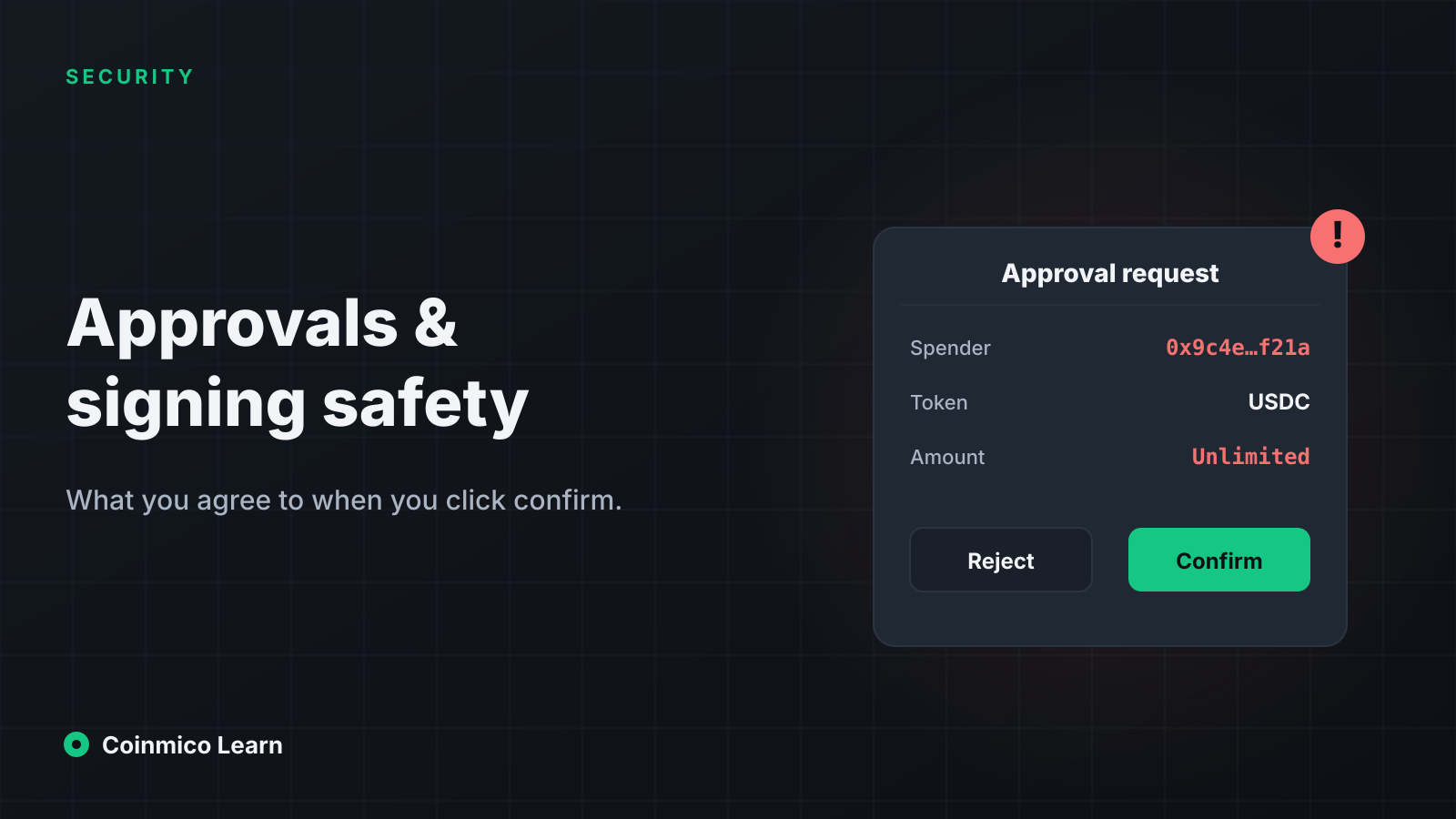
Tokens on Ethereum-style chains follow a standard in which the token contract keeps a balance for each address — and, separately, an allowance: how much of your balance another address is permitted to move. To swap USDC on a DEX, the DEX's router must be allowed to take USDC from you. You grant that by signing an approve transaction naming the router (the spender) and an amount.
The DEX lesson mentioned this as step two of a swap. What it did not say is that the approval persists. Once granted, the spender can move up to that amount from your wallet at any future time, in any transaction, without another prompt.
Two consequences:
- Unlimited approvals. Interfaces default to an amount of "unlimited" so you never need to approve again. That means the spender can take your entire balance of that token — now, or in three years.
- Approvals outlive the site. If the contract you approved is later exploited, or was malicious from the start, your approval is the attacker's ticket. You do not have to visit the site again. You do not have to do anything.
How drainers use it
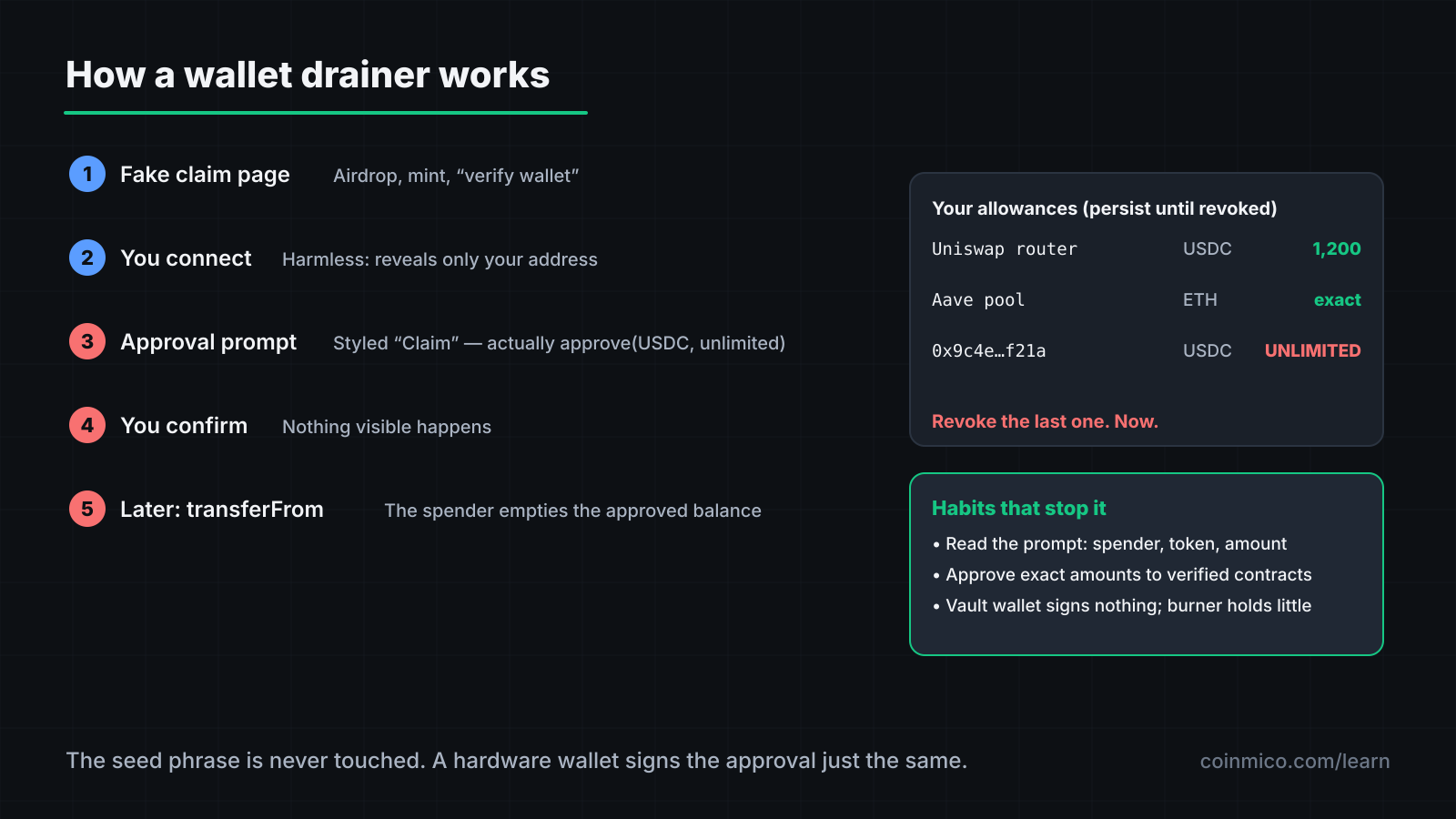
A wallet drainer is a kit — sold to scammers as a service — that runs behind a fake site: a counterfeit airdrop, a fake mint, a clone of a real DEX, a "claim your reward" link in a hacked Discord or a hijacked project account.
- You connect your wallet. This is harmless by itself; it only reveals your address.
- The site reads your balances and picks the most valuable token.
- It prompts an approval for that token to the drainer's contract, styled as "Claim", "Verify" or "Enable trading". Some prompts request approval for several tokens in one batch.
- You confirm. Nothing visible happens — or a fake success message appears.
- Minutes or days later, the drainer calls transferFrom and empties the approved balances.
Hardware wallets display the approval, but the display is a spender address and an amount, which is meaningless unless you check the address against a known contract. Most people press confirm.
Signatures that are not transactions
A second class of prompt asks you to sign a message rather than send a transaction. It costs no gas and the site says it is "just to log in" or "verify ownership". Often it is. Sometimes it is an off-chain order: a signed instruction that a marketplace or permit system will later execute on chain.
Two forms matter:
- Permit / Permit2. A signed message that is an approval — it grants an allowance without a transaction. Everything above about approvals applies, but the prompt looks like a harmless signature.
- Marketplace listings. A signed message that lists your NFTs or tokens for sale at a price of zero to a specific buyer. Signing it is giving them away.
The wallet prompt will show the structured data being signed. If it contains a spender, a token, an amount or a deadline, it is an authorisation, whatever the site calls it. If the wallet warns that the data is unreadable (a raw hash), refuse: legitimate sites do not require blind signatures.
Address poisoning
A related trick targets the habit of copying addresses from transaction history. The attacker sends a zero-value transfer to you from an address whose first and last characters match one you often send to. When you next copy "your usual address" from history, you copy theirs. Check the whole address, or use the wallet's address book, not history.
The habits that prevent this
Read the prompt, not the page. The site can say anything. The wallet prompt shows what will actually happen: the contract being called, the function, the spender, the amount. Learn to find those four things in your wallet's confirmation screen.
Approve exact amounts. Most wallets and interfaces allow editing the approval amount. Set it to the size of this trade. It costs one more approval next time and removes the standing risk.
Revoke what you no longer use. Approval-management tools list every allowance an address has granted and let you revoke each with one transaction. Review quarterly, and immediately after any news of a protocol being exploited.
Use separate wallets.
| Wallet | Holds | Interacts with |
|---|---|---|
| Vault | Long-term holdings | Nothing. Receives only; sends only to your own other wallets. Hardware-backed. |
| Daily | What you are actively trading | Established protocols you have used before |
| Burner | Small amounts you can lose | New sites, mints, airdrops, anything unfamiliar |
A drainer that empties the burner takes what you put in it. A vault that never signs an approval cannot be drained.
Verify contract addresses. Before a large approval, check that the spender is the protocol's published router or contract address, from its documentation — not from the site prompting you.
Simulate. Several wallets and extensions show the expected balance changes of a transaction before you sign. If a "claim" would decrease your balances, it is not a claim.
If you have already signed one
Revoke the approval immediately — before the drainer acts, if you are quick. Move the remaining balances of that token to a fresh wallet. Assume any other approvals granted on the same site are also malicious and revoke them. The seed phrase is not compromised by an approval, so the wallet itself can be kept; the approvals cannot.
 EthereumETHAcross 50 spot markets we index
What this means in practice
- An approval is standing permission to take your tokens. Grant exact amounts, to verified contracts, and revoke them when done.
- A gas-free signature can move assets. Read the structured data; refuse blind hashes.
- Keep a vault that signs nothing and a burner that holds little. The risk lives in the wallet that does both.
Where to go from here
You have finished the Security track and the initial Coinmico Learn curriculum. The Glossary defines every term these lessons introduced, with a link from each to the Coinmico page where the figure is measured live. From here, the Research section applies these ideas to specific markets, with the data blocks you have seen throughout.
Assets in this piece
 Ethereum
 Solana
Every figure here is measured by Coinmico across the venues and chains we index. See our methodology.