Exchange account security: closing the routes attackers actually use
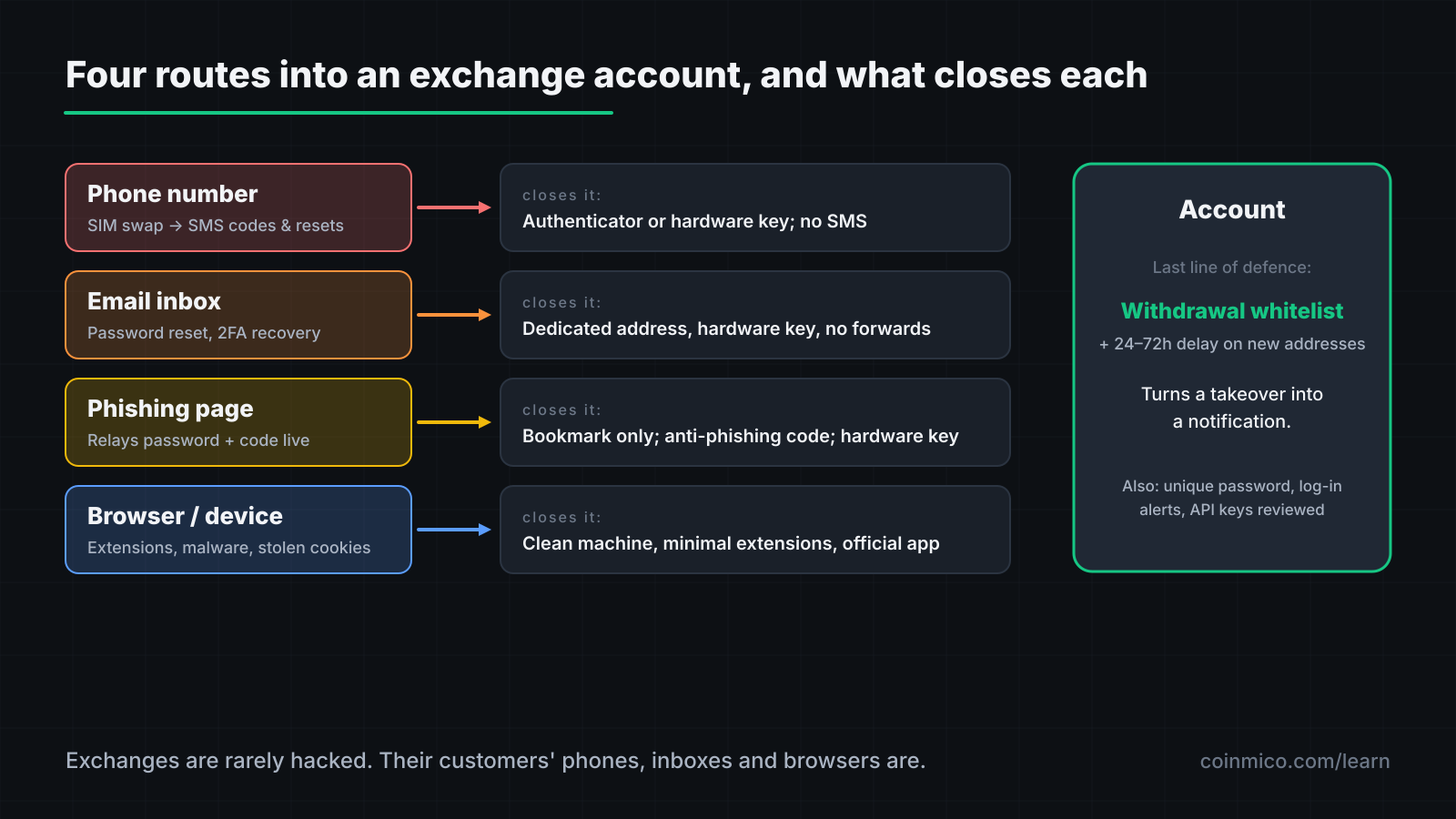
Exchange accounts are rarely hacked through the exchange. They are taken over through the email, phone number and browser attached to them. This lesson closes each route, in order of how often it is used.
What you will learn
- SMS two-factor is the weakest option because a phone number can be transferred to an attacker by the carrier. Use an authenticator app or a hardware key.
- The email account that can reset your exchange password is the real key to the exchange. Secure it at least as well.
- Withdrawal address whitelists with a time delay turn an account takeover from a total loss into an alert you can act on.
Exchanges are heavily defended targets. Their customers are not. Nearly every stolen exchange balance is stolen by taking over the customer's account through something the customer controls: a phone number, an email inbox, a browser. Each has a fix.
Route 1: the phone number
SIM swap. An attacker persuades or bribes your mobile carrier to move your number to a SIM they hold. Every SMS code — for the exchange, for your email, for password resets — now arrives on their phone. This is a routine attack against anyone known to hold crypto, and it defeats SMS two-factor authentication completely.
Fix: never use SMS as a second factor for anything connected to your funds. Use one of:
- Authenticator app (TOTP): codes generated on your device, not sent to your number. Back up the app's seeds when you set them up, or you lock yourself out when the phone breaks.
- Hardware security key (FIDO2/passkey): a physical key that must be present to log in. Immune to phishing because it only responds to the genuine domain. The strongest option; most large exchanges support it.
Then remove your phone number from account recovery where the exchange allows, and add a port-out PIN with your carrier.
Route 2: the email inbox
Your exchange password can be reset by email. That makes the email account the master key: whoever controls it can reset the exchange password, and often the second factor too, through "lost device" flows.
Fix:
- Use a dedicated email address for exchanges, never given out elsewhere, so it does not appear in the breaches of unrelated sites.
- Secure that inbox with a hardware key or authenticator app — not SMS.
- Turn off email forwarding rules and check for ones you did not create; attackers who briefly gain access add a silent forward and leave.
Route 3: phishing
A message arrives — email, SMS, Telegram, a search-engine ad — with a link to a page that looks exactly like the exchange. You log in. The page relays your password and, in real time, your two-factor code to the real exchange, and the attacker is in.
Phishing defeats authenticator apps, because you type the code into the fake page. It does not defeat hardware keys, because the key checks the domain.
Fix:
- Reach the exchange by typing the address or by bookmark. Never from a link in a message, and never from a search ad — attackers buy ads for exchange names.
- Set the anti-phishing code most exchanges offer: a phrase you choose that appears in every genuine email. A message without it is fake.
- Assume any unsolicited contact from "support" is an attacker. Exchanges do not initiate chats, calls or DMs.
Route 4: the browser and device
Malicious browser extensions, fake wallet apps in app stores, and infostealer malware from a pirated download can read what you type, swap the address you paste, or lift session cookies that log the attacker in without a password.
Fix:
- Keep the machine you use for finance clean: no pirated software, minimal extensions, operating system updated.
- Check extensions periodically and remove any you do not recognise.
- Prefer the exchange's official mobile app to a browser on a shared computer.
The setting that limits the damage
Even with everything above, assume an account could be taken over. Two exchange features cap the loss:
Withdrawal address whitelist. Only pre-approved addresses can receive withdrawals, and adding a new one triggers a delay — 24 to 72 hours — with email and app notifications. An attacker who gets in cannot withdraw to their own address before you see the alert and lock the account.
Withdrawal limits and cooldowns after security changes. Many exchanges freeze withdrawals for 24 hours after a password or 2FA change. Leave that on.
Enable both. They are mildly inconvenient exactly once, when you set them up.
Passwords and the account itself
- A unique password per exchange, long and random, kept in a password manager. Reused passwords are how one site's breach opens another.
- Log-in notifications on, so a new device or country produces an alert.
- Review active sessions and API keys occasionally. An API key with withdrawal permission created by an attacker survives a password change.
- Never give an API key withdrawal permission unless a specific tool needs it, and then restrict it by IP.
A setup checklist
- Hardware key or authenticator app on the exchange; SMS removed.
- Dedicated email for exchanges, itself protected the same way, with no forwarding rules.
- Anti-phishing code set; exchange bookmarked; no links from messages.
- Withdrawal whitelist on, with a delay for new addresses.
- Unique password in a manager; log-in alerts on; API keys reviewed.
An hour of setup closes the routes that account for almost all exchange-account losses.
| Coin | Price | 24h | 24h volume | Market cap |
|---|---|---|---|---|
 BitcoinBTC BitcoinBTC | $84,060.65 | 2.78% | $20.97B | $1.69T |
 EthereumETH EthereumETH | $2,662.42 | 3.24% | $9.37B | $325.0B |
 TetherUSDT TetherUSDT | $0.9998 | 0.01% | $1.19B | $183.4B |
 BNBBNB BNBBNB | $766.70 | 2.79% | $506.5M | $102.1B |
 XRPXRP XRPXRP | $1.50 | 4.61% | $3.91B | $94.29B |
What this means in practice
- The phone number and the email inbox are the account. Secure them first.
- A hardware key is the only second factor phishing cannot beat.
- A whitelist with a delay turns theft into a notification.
Next in this track
On-chain, there is no account to secure — only transactions you sign. The final lesson is about the single most common way self-custodied funds are lost: approving a transaction you did not understand.
Assets in this piece
 Bitcoin
Every figure here is measured by Coinmico across the venues and chains we index. See our methodology.